
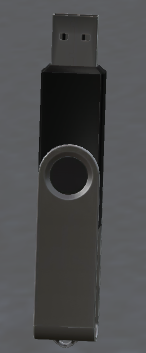
Getting the printer running
- Find the required parts: 3D Printer, Filament, and power through USB, Solar Panel, or Printer Battery.
- Place the 3D Printer Kit and place the Solar Panel.
- Make sure the Cable Reel is connected to both the Solar Panel and the Printer.
- Interact with the UI and press F on Print.
- Insert a USB to reveal what it can print and what filament color it needs.
- Use Toggle Tray to eject the filament tray so you can add or remove filament reels.
- Use Memory for items the printer can print without a USB.
- Optional Table and Filament Tray pieces add storage for filaments and USBs.
Printer photo references
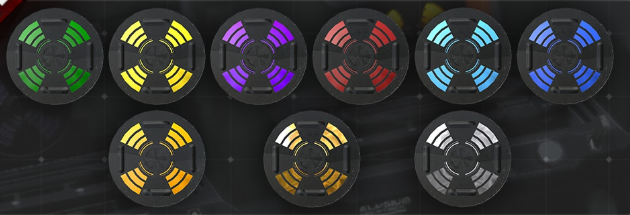
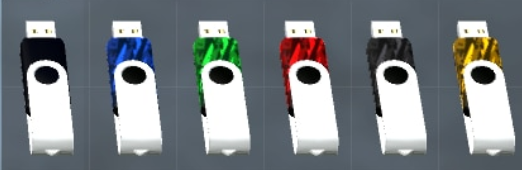
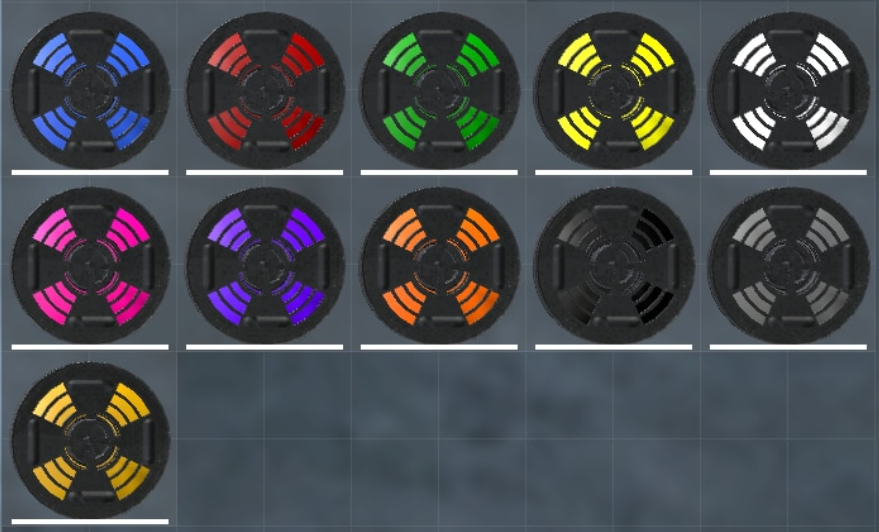
Dark USB recipes
| USB | Output | Notes |
|---|---|---|
| Dark Grey & Black USB Type 1 + Silver | InkCoin_Silver | Used to purchase city keys |
| Dark Grey & Black USB Type 2 + Blue | PKP mag + ammo | Ammo recipe |
| Dark Grey & Black USB Type 3 + Light Blue | AS50 mag + ammo | Ammo recipe |
| Dark Grey & Black USB Type 4 + Green | Alligator 5rd mag + ammo | Ammo recipe |
| Dark Grey & Black USB Type 5 | TBD | Recipe not finalized |
Striped USB recipes
| USB | Output | Notes |
|---|---|---|
| White & Black USB + T9 Black | InkCoin_Black | Choose 1 piece of Ink Custom Clothing |
| White & Blue striped USB + T1 Blue | InkCoin_Blue | Choose 1 Custom Ink Rifle bag |
| White & Green striped USB + T3 Green | InkCoin_Green | Turn in for the LobotomyV1 Shotgun |
| White & Red striped USB + T2 Red | InkCoin_Red | Choose 1 Custom Ink reskinned Redo rifle bags |
| White & Grey striped USB + T5 White | InkCoin_White | Choose 1 of any Ink Plushies |
| White & Yellow striped USB + T4 Yellow | InkCoin_Yellow | Ink Sunglasses colored |
Built-in recipes
| Filament | Output | Notes |
|---|---|---|
| T10 Titanium | Ink_Lockpick | Built-in recipe using Black Market filament |
| T11 Gold | InkCoin_Gold | Loot dropped filament. Use at merchant for 8 pieces of Ink Clothing |
Tools vendor filaments
- Yellow
- Violet
- Red
- Blue
- Orange
- Silver
- Gold
Black Market filaments
- T1 Blue
- T2 Red
- T3 Green
- T4 Yellow
- T5 White
- T6 Pink
- T7 Purple
- T8 Orange